Knowledge Sources
All AI agents have common sense knowledge. But what if you want your agent to understand your company’s products, policies, or unique processes? That’s where knowledge sources come in - they let you give agents information and data specific to your organization that they can learn from and use.
What are Knowledge Sources?
Knowledge sources are data collections that provide your AI agent with essential business context. They serve as your agent’s long-term memory, allowing it to access and reference your organization’s information when needed.
There are two main types of knowledge sources:
- Website & File Uploads: Static content from various sources
- Notes: Dynamic, easily updatable content that can be created and edited within MindPal
How Knowledge Sources Work
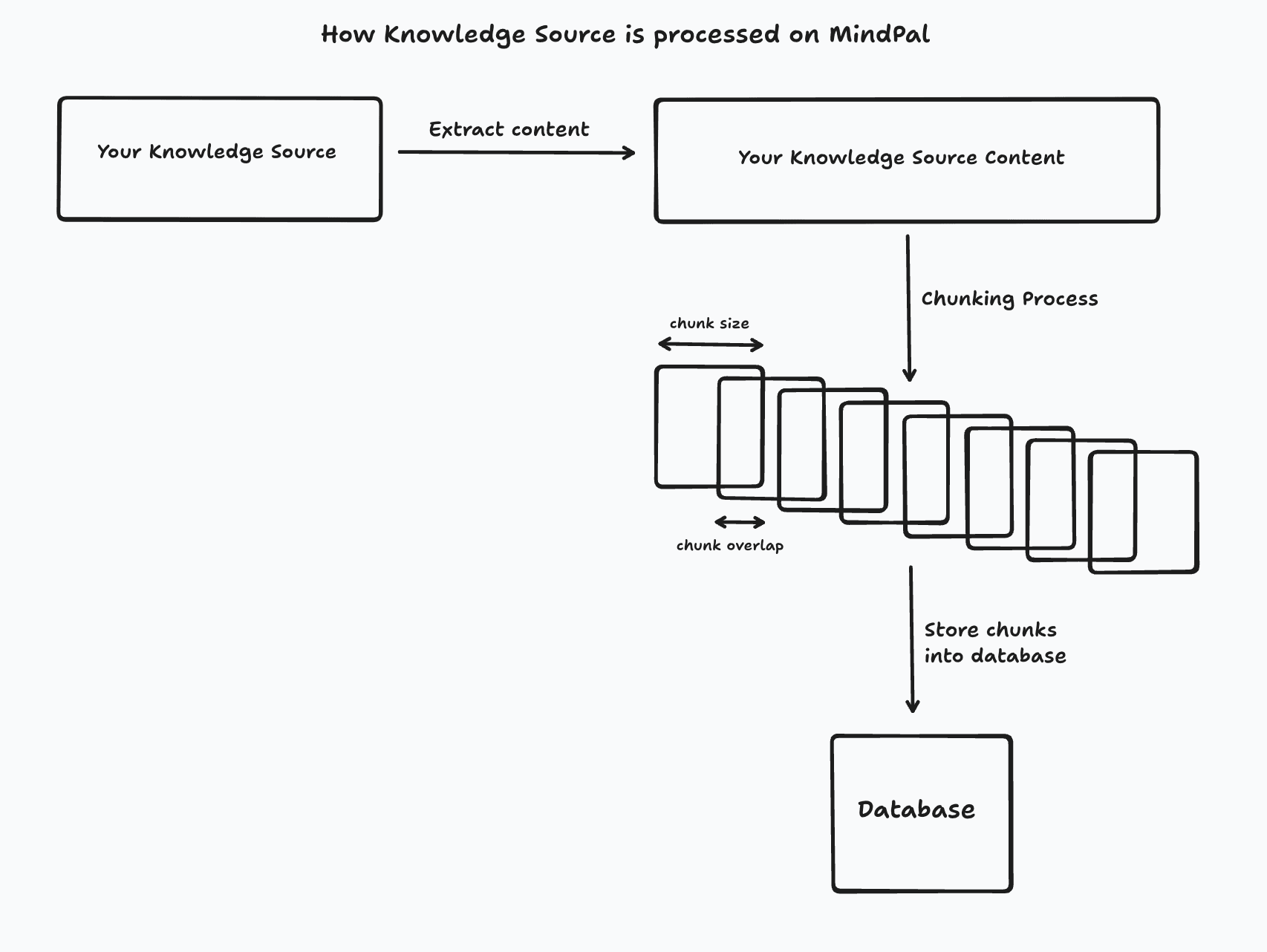
Knowledge sources are processed and stored in a way that makes them easily accessible to your AI agent:
- When you upload content, it’s automatically processed and segmented into manageable chunks
- These chunks are then vectorized and stored in the database
- When your agent needs information, it searches through these chunks using semantic similarity
- The most relevant information is then used by the agent to provide accurate responses
Configuring Knowledge Sources
Uploading Files & URLs
You can upload files and URLs as knowledge sources by navigating to “Assets” → “Knowledge Sources”.
Supported File Formats
| Type | Formats | Max Size |
|---|---|---|
| Documents | PDF, DOCX, XLSX, CSV, TXT, EPUB | 100 MB |
| Images | JPEG, PNG, GIF, WebP | 20 MB |
| Media | Video (MP4, WebM), Audio (MP3, WAV) | 100 MB |
For best results with documents, use well-formatted PDFs with clear text. Scanned documents may have lower accuracy.
URLs and Websites
For URLs, you can:
- Add individual pages by entering the URL directly
- Fetch sub-pages by clicking “List all sub pages” to discover linked pages
- Update content later using the “Relearn” button
Processing Parameters
For each knowledge source, you can optionally fine-tune how MindPal processes the content:
| Parameter | Description | Default |
|---|---|---|
| Chunk Size | Maximum size of each content segment | Auto |
| Chunk Overlap | Overlap between consecutive chunks for context continuity | Auto |
| Separators | Characters that guide content splitting | Auto |
For most use cases, the default “Auto” settings work well. Adjust parameters only if you notice retrieval quality issues.
Creating Notes
You can create notes by navigating to “Assets” → “Notes”.
Notes are dynamic and easily updatable, allowing you to add, edit, or remove information as needed.
Assigning Knowledge Sources & Notes to Agents
After you have uploaded your knowledge sources and notes, you can assign them to agents in the agent settings.
You can assign multiple knowledge sources and notes to an agent.
For knowledge sources, you can select individual items or folders. If you select a folder, all items within that folder will be assigned to the agent and any changes made to the folder (addition, update, or removal of items) will be automatically applied to the assigned agents.